QuickBooks MCP: How to Connect QuickBooks to Claude and Automate Your Close


If you run accounting at a growing company on QuickBooks Online, you've probably noticed something frustrating about AI tools.
They can do almost anything, from summarizing documents to drafting emails and writing SQL, but they can't actually touch your accounting data. Ask Claude to pull your balances or tie out a reconciliation, and the answer is always the same: "You'll need to export that from QuickBooks first."
MCP changes that. A QuickBooks MCP server lets AI assistants read and act on your QuickBooks data directly, without exports or copy-paste.
This guide covers what a QuickBooks MCP server does, how to get one connected, and the limits of what the MCP can provide, plus how pairing it with Numeric's MCP turns Claude into a teammate that can help run your month-end close and more.
What Is a QuickBooks MCP Server, and Why Should Accountants Care?
MCP stands for Model Context Protocol, an open standard introduced by Anthropic that lets AI assistants connect to outside tools and data sources through a common interface.
Think of it as a universal adapter. Instead of AI that only works with what you paste into a chat window, MCP lets Claude operate inside the systems you already use, like QuickBooks, Google Sheets, Slack, Gmail, and Numeric.
A QuickBooks MCP server exposes your QuickBooks Online data and actions to an AI client. Depending on which server you run, that includes:
- Reading your chart of accounts, customers, vendors, items, and classes
- Pulling transaction data: invoices, bills, journal entries, payments, deposits
- Generating reports: P&L, balance sheet, cash flow, A/R aging, A/P aging
- Creating or updating transactions when you grant write permission
- Querying your GL in plain English without building an advanced report
The problem this solves is one accounting teams know intimately. Your GL lives in QuickBooks. Your close checklist lives in a spreadsheet or a project tool. Your reconciliations live in Excel or Google Sheets. Your status updates live in Slack or email. Every workflow that crosses more than one of these systems requires a human to manually carry information between them.
MCP collapses that gap. And for teams on QuickBooks, it's the first time AI can actually do useful work on your books without you building an integration from scratch.
5 Things You Can Do in Claude Once QuickBooks Is Connected
Claude works as a layer on top of QuickBooks, letting you ask questions, pull data, and string actions together faster than clicking through the UI.
A few examples of what controllers and accounting managers do on day one:
Query the GL in plain English. "What did we spend on AWS in Q3?" Claude builds the report, filters to the relevant account, pivots by vendor, and returns the answer. Same question in QuickBooks alone would take four to six clicks, a saved filter, and an Excel export.
Pull reports without hunting for them. "Give me our trailing 6-month P&L by month, comparing this year to last year." Claude runs it, formats it, and hands you a clean output you can drop into a board deck.
Investigate anomalies at the transaction level. "Why did travel expense jump in October?" Claude pulls the transactions, groups by vendor, and flags the one-time charges.
Reconcile against external data. Upload a vendor statement or a bank report, and Claude compares it to what's posted in QuickBooks and flags the differences.
Draft journal entries for review. Give Claude the facts, like "We prepaid $48,000 for a 12-month software subscription on September 1," and it drafts the entry, including the amortization schedule. You review, approve, and post.
Every question becomes a conversation instead of a scavenger hunt.
How to Set Up QuickBooks MCP: 3 Ways to Connect QuickBooks to Claude
Three main paths exist today. The right one depends on how technical your team is, whether you want a hosted or local setup, and whether you're working from raw GL data or on top of a platform that's already organized your close.
Path 1: Run Intuit's Official QuickBooks MCP Server Locally
In October 2025, Intuit released an official QuickBooks Online MCP server as an early preview. It's an open-source TypeScript/Node.js package built on the QuickBooks Online Accounting API.
Two things to know:
- It runs locally via stdio transport. That means it works with Claude Desktop and similar clients that support local MCP servers, rather than the web versions of Claude.ai or ChatGPT.
- The preview is aimed at developer experimentation. The server supports both sandbox and production environments through the QUICKBOOKS_ENVIRONMENT config variable, but Intuit has positioned this release as a place for developers to test the API before deploying their own apps, not as a turnkey connection to live books.
Setup:
bash
# Requires Node.js 18 or higher
git clone https://github.com/intuit/quickbooks-online-mcp-server
cd quickbooks-online-mcp-server
npm installYou then register an app in the Intuit Developer Portal, grab your client ID and client secret, set the QUICKBOOKS_ENVIRONMENT variable to sandbox or production, and either supply an existing refresh token and realm ID or run the built-in OAuth flow to generate them.
Configure your MCP client (Claude Desktop, Windsurf, etc.) to point at the server and you're connected.
Use this path if you want to understand how QuickBooks MCP works under the hood or build a custom internal tool. Skip it if you just want to connect live books and start using Claude for close work.
Path 2: Use a Third-Party Hosted or Open-Source QuickBooks MCP Server
Because Intuit's server is local-only, the community has built alternatives that fill different gaps:
- Hosted bundles like MCPBundles and Pipedream offer QuickBooks MCP servers accessible over HTTP, so they work with any MCP client, including Claude.ai, Claude Desktop, Cursor, and n8n. MCPBundles, for example, wraps the full QuickBooks Online API with financial reports, batch operations, and a SQL-like query tool.
- Community GitHub projects like laf-rge/quickbooks-mcp target financial professionals working with production books and include production-oriented features like AWS Secrets Manager for credential storage.
- Framework-specific packages like the Laravel QuickBooks MCP let engineering teams embed a server into their own application stack.
The tradeoff is the same one you make with any third-party API integration: you're trusting a vendor or open-source maintainer with credentialed access to your books. Do the standard due diligence on who's maintaining it, what permission scopes it requests, how tokens are stored, and whether there's an audit trail.
For most accounting teams, this is more flexibility than you need. Which brings us to the third option.
Path 3: Connect QuickBooks to Claude Through the Numeric MCP
This is the path most useful for teams doing real close work. Instead of connecting QuickBooks directly and building on raw GL data, you connect through Numeric, which already sits on top of QuickBooks and organizes your close, reconciliations, flux, and reporting.
The distinction: a direct QuickBooks MCP gives Claude access to your GL. A Numeric MCP gives Claude access to your GL plus your close checklist, reconciliations, flux explanations, task assignments, and review history. All already structured, already tied to the workflows your team runs every month.
Claude.ai or Claude Desktop:
- Go to Settings → Connectors
- Add the Numeric MCP server using https://api.numeric.io/mcp
- Log in with your Numeric credentials when prompted
- Start a conversation.
Claude Code:
bash
claude mcp add --transport http numeric https://api.numeric.io/mcpThen run /mcp to authenticate.
Once connected, Claude has the same access as your Numeric user account. Your QuickBooks data flows through Numeric's existing sync, so it arrives already reconciled and mapped to your close workflows.
Where QuickBooks MCP Falls Short for Accounting Teams
QuickBooks MCP solves the query problem, and that part works. But that's also the whole of what it solves. Spend a few weeks running it day to day and three things surface: it's early and inconsistent depending on which server you're running, it can look things up but can't carry out a workflow, and it's built on a data foundation that isn't ready for the AI-agent era.
QuickBooks MCP Is Slow and Depends on Which Server You Use
Two problems show up right away: it's slow, and reliability depends on which server you use.
Intuit's official server is still a developer test version, so most teams connect through one built by someone else. Connection stability and support vary depending on who maintains it.
The slowness has a clearer cause. When an AI client queries QuickBooks directly, it gets back whatever the report or transaction pull returns, often a token-heavy payload of raw line items. A few thousand transactions with memo fields, customer names, and class segments is a lot for a model to chew through.
Response times slow down. Outputs vary, too, because the model re-interprets your chart of accounts and classification logic fresh on every prompt instead of working from something already resolved.
What QuickBooks MCP Can't Do for Your Close
QuickBooks MCP alone does not:
- Reconcile accounts with any real reliability. It can look up records, but it has no way to independently derive what a balance should be, so matching and chasing down exceptions still comes down to manual, rule-based work that a general-purpose AI connector isn't built to perform.
- Prove the work actually happened. Auditors want a documented trail of who reviewed what and when, with supporting evidence attached.
- Trace a variance back to the transactions that caused it.
These gaps usually surface at audit time, when that evidence has to be ready.
Why QuickBooks' Journal Entry Model Limits Any MCP
These gaps trace back to what the protocol actually moves: journal entries, and whatever fields survived being attached to one. Reporting on any dimension in real time, and tracing any number straight back to the business event that produced it, both depend on context that gets stripped out the moment a transaction becomes a journal entry.
Numeric's ERP replacement, the Financial Data Platform (FDP), stores every business event as an object and derives the accounting from it directly, so the context these workflows need is there from the start.
That's the core of what Numeric calls data-centric accounting: the ledger doesn't force you to decide upfront which dimensions matter, because nothing requires flattening a transaction into a fixed chart of accounts before you can report on it. Tag an invoice by department, vendor, or project whenever you actually need to, even months later, and every report that touches it picks up the change retroactively. A traditional general ledger forces you to answer "how will I slice this" before the data even exists. Data-centric accounting lets you answer that whenever you want.
.svg)
Take something as ordinary as a prepaid expense. In QuickBooks, you book it with a journal entry and set up a schedule of amortization entries to release it over time. Change the term or the amount partway through, and you're canceling that schedule, posting reversing entries for whatever already ran, and rebuilding it by hand, often with a side spreadsheet to keep it straight.
On the FDP, you edit the prepaid object itself, just the new amount and new dates, and the accounting recalculates automatically from there. Nothing to reverse, because the object was never flattened into something disconnected from the event that created it.
3 Ways to Use Numeric With QuickBooks MCP
The emerging architecture pattern for teams running QuickBooks looks like this: QuickBooks MCP handles ad-hoc queries and record actions, a structured accounting platform handles recurring close, cash, and reporting workflows, and both connect to the same AI client. Numeric fills the structured layer.
There are three ways to use Numeric with the QuickBooks MCP, depending on the problem you're trying to solve.
Option 1: Query Your Close Data Through the Numeric MCP
This is the fit for teams already running close or cash through Numeric who want their AI answers to be as reliable as the data underneath them.
With Numeric's MCP, Claude works from the context your team adds as they close, like reconciliation notes and flux explanations, instead of a raw QuickBooks export. The Numeric MCP lets any AI client query that context directly. Your CFO's ChatGPT instance can ask the same plain-English questions QuickBooks MCP allows, with answers that reflect what your team already knows about the numbers.
A few starter workflows show what this looks like once you're connected. Each replaces an hour or more of manual work, and none requires code:
The morning close standup. "Check all open close tasks for the current period. List anything overdue or due today. For each task, pull the current balance for the related account. Post a summary to our #accounting-close Slack channel." Replaces the 20 minutes of list-pulling, balance-checking, and status-drafting that starts every close morning.
The ad-hoc board question. Your CFO emails at 4 p.m. on a Tuesday: "What's our trailing 6-month gross margin trend, and what's driving it?" "Build a trailing 6-month income statement, calculate gross margin by month, and identify the three accounts with the largest impact on the change. Pull the flux commentary from Numeric, or if there isn't any, draft an explanation." Three minutes of review instead of 45 minutes in your GL and Excel.
The audit packet. "For the October close, pull the full task history: who prepared each reconciliation, who reviewed it, when it was submitted and approved, and any comments. Flag any task where the same person submitted and approved. Export it as an Excel file for the auditors." Replaces half a day of pulling activity logs for PBC requests.
Option 2: Use QuickBooks MCP for Queries, Numeric for Close Management and Cash
This is the fit for teams who want to keep QuickBooks MCP for the ad-hoc lookups, while routing the recurring close and cash work to a system built to run it end to end instead of just query it.
QuickBooks MCP can look up a balance, but it can't run your cash matching, which stays manual on the other side of the query. Teams cut cash reconciliation effort by up to 90% with Numeric's Cash Management module.
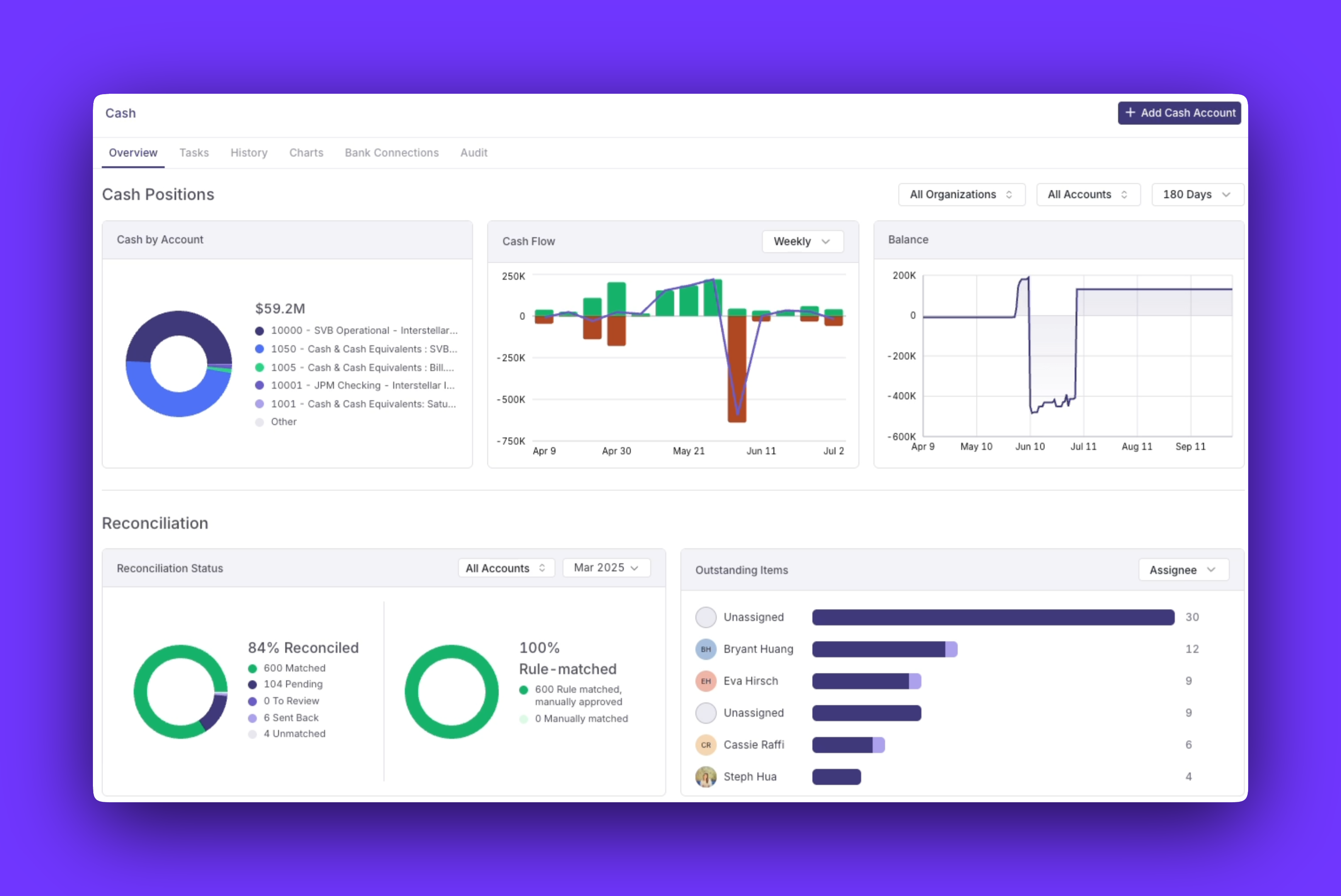
Because Numeric exposes that same structured data through its own MCP server, close status, reconciliation exceptions, and flux commentary all stay queryable from the same AI client you're already running QuickBooks MCP in.
Option 3: Migrate From QuickBooks to Numeric's ERP Replacement, the Financial Data Platform
This is the fit for teams that see QuickBooks itself as the problem to solve.
The FDP replaces the ledger itself with a data-centric approach to accounting rather than a ledger-centric one. It's Numeric's own path beyond QuickBooks.
How to Keep QuickBooks MCP Secure and Audit-Ready
Controllers reading this are, correctly, thinking about security. Three things to be clear on.
MCP uses standard OAuth. Whether you connect QuickBooks directly, through a third party, or through Numeric, you go through Intuit's OAuth flow. Your password never touches the MCP server or the AI client. You can revoke access from your QuickBooks admin panel at any time.
Permissions mirror the connected user. The AI client has the same access as the account it connects through. If you don't want Claude to draft journal entries for review/posting with write permissions, connect through a read-only user. If you want writes only in a test environment, connect your sandbox company first.
Every action is logged. Numeric logs every tool call Claude makes, including the tool, its parameters, the user who started the session, and the result. The MCP becomes part of your audit trail.
The right starting posture for most teams: connect with read access, use it for a month, prove out the value, then scope up to write access for specific workflows where the time savings justify it.
Final Thoughts: QuickBooks MCP Is Only as Good as the Data Underneath It
QuickBooks MCP is a real step forward for ad-hoc queries, but it can't close your books, reconcile your cash, or produce the structured outputs your auditors and board expect, because of what it's querying. A protocol can only work with the data underneath it, and QuickBooks' data is already missing the context those workflows need.
If you're looking to fix the data problem at its source, explore Numeric's ERP replacement, the Financial Data Platform.
QuickBooks MCP FAQs

Related Content
.png)
Billing and Revenue Management: A Guide for SaaS Finance Teams
Billing and revenue management keeps invoices and ASC 606 revenue tied to one contract. See how contract changes affect both and how to evaluate a solution.
.png)
Automated ASC 842: From Lease PDF to Audit-Ready Schedule
How to automate ASC 842 lease accounting, from extracting lease terms to the ROU asset, lease liability, and journal entries your auditors can trace.
.png)
ERP for SaaS: How to Choose an Accounting System Built for Subscription and Usage Revenue
A guide to choosing an ERP for SaaS, covering ASC 606 revenue recognition, usage-based billing, multi-entity, reporting, and a checklist for vendor demos.